Install Go
Download and install Go 1.26 or newer.
Go Installation Guide ↗Check Go Version
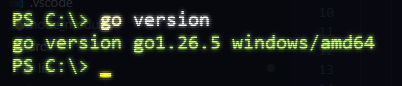
Build your first Gorbit application.
Download and install Go 1.26 or newer.
Go Installation Guide ↗ Choose a code editor or integrated development environment (IDE) for Go development. Any editor can be used, but the following options provide excellent support for Go, including syntax highlighting, code completion, debugging, and integrated tooling.
Visual Studio Code ↗JetBrains GoLand ↗Helix Editor ↗If you're using Visual Studio Code, install the official Go extension to enable features such as IntelliSense, code navigation, formatting, testing, debugging, and automatic package management.
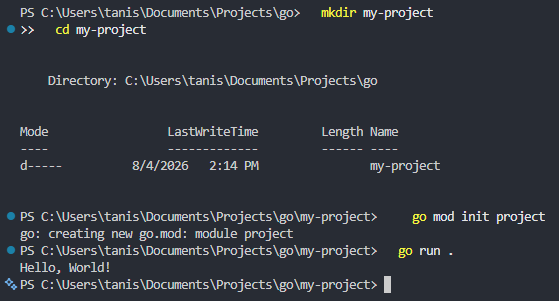
Go Extension for Visual Studio Code ↗Create a new directory for your project and initialize a Go module. The module name should usually match your repository path if you plan to publish it.
This creates a go.mod file, which defines your project's module path and manages its dependencies.
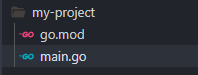
Gorbit can be added to any existing Go module using the Go package manager. Make sure you have initialized your project with 'go mod init' before installing the framework.
Gorbit GitHub Repository ↗Go will automatically download Gorbit and its required dependencies, then record them in your project's go.mod and go.sum files.
With Gorbit installed, you're ready to create your first web server. The example below starts a server on port 3000 and responds with "Hello World" when the root route is accessed.
Run the application from your project directory using the Go toolchain.
Once the server starts, open your browser and navigate to the address below. You should see the message "Hello World" displayed in your browser.
http://localhost:3000 ↗A well-structured project keeps your application organized, maintainable, and easy to scale. Gorbit does not enforce a specific folder layout, but the following RESTful architecture is recommended for most applications.
Each directory has a single responsibility. Separating your application into layers makes it easier to maintain, test, and extend as your project grows.
This architecture keeps routing, request handling, business logic, database access, and utilities independent of one another, making the codebase easier to understand, test, and scale as your application evolves.